A Claude Code skill, version 1.0.0
A design review that shows its measurements.
loupe reviews an interface against Apple’s Human Interface Guidelines and the research around them. It measures what it can in the running app, says how strongly Apple states each rule it cites, and tells you when a screen looks like every other template. It works on iOS, iPadOS and macOS apps and on the web.
npx skills add AshwinSathian/loupeRun it in a terminal. Free and MIT-licensed. Other ways to install, including the Claude Code plugin.
Specimen
One page, under the loupe
A tool-lending library page, written for our tests by a separate model that was told not to read loupe’s rules. These are findings loupe returned in a blind run. Pick one to move the ring.
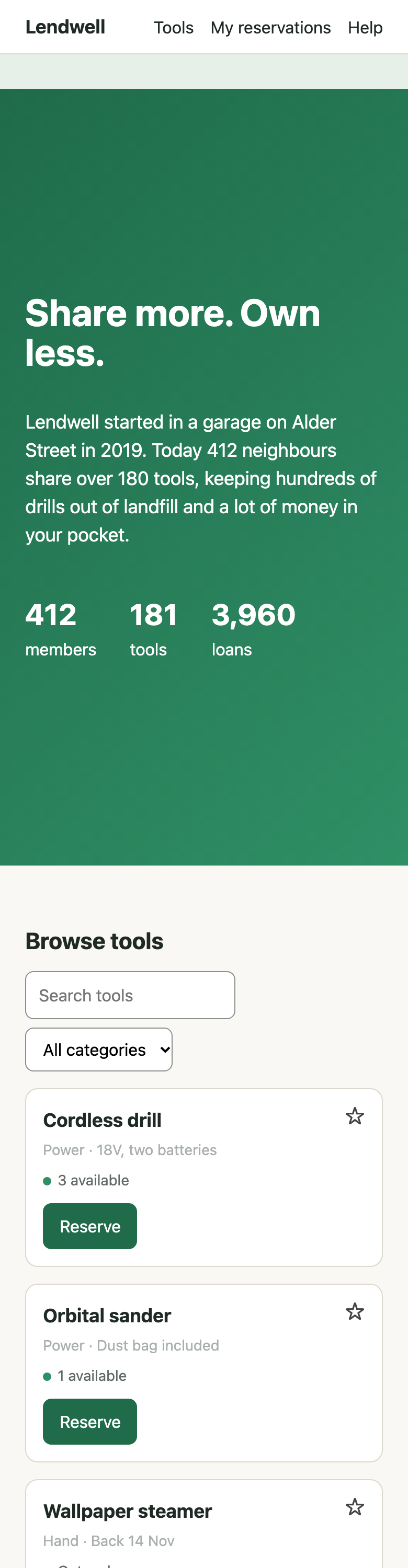
Card notes measure 2.21:1
Blocker Web
#a9b0ab on white, 14 px, on all six cards, including “Back 14 Nov”, the only reason given for a disabled Reserve. WCAG 1.4.3 needs 4.5:1. Fix: use the page’s own --muted, which measures 5.56:1.
Two tags on every finding
How bad it is, and how sure Apple is
- Blocker
- Needs evidence of one of these: a measured or source-confirmed WCAG A or AA failure; an Apple MUST on an iPhone, iPad or Mac app whose breach stops the task, blocks an accessibility need or risks App Review rejection; data loss; deceptive design; or a task that can’t be finished in a release build.
- Major
- Feels wrong, non-native or generic. Judged issues stop here.
- Minor Polish
- Small costs, and finish.
- MUST SHOULD CONSIDER
- Copied from Apple’s wording. Never upgraded.
- Web
- An Apple rule translated to the web, or a WCAG-backed web rule.
- Research Taste
- Outside research where Apple is silent, and reviewer judgement, labelled as such.
Method
The steps of a review, report before edits
Numbered as in the skill.
- 0
Scope
Settles what is under review (a screen, a flow, the whole app or a design system) and what it has to work from.
- 1
Profile
Reads your design docs, tokens and manifests, asks what it can’t find in one batch, and saves a .loupe.md once you confirm it.
- 1b
Landscape
Researches your category and 3 to 6 peers, with sources and dates, so proposals reflect what the best products do now.
- 2
Intake
On the web: contrast, targets, type and motion at three widths, light and dark, reduced motion on and off. On Apple platforms: the source, and the simulator if one is running.
- 3
Stress states
Tries the states demos skip: empty, error, offline, long text, the largest text size, right-to-left.
- 4
Passes
Nine passes against Apple’s guidance, ending with a red team that attacks the premise, the flows and its own draft.
- 5
Whole-app split
Splits a large app across subagents, then merges the results with a fresh red team.
- 6
Report
Findings with two tags, the landscape, a distinctiveness verdict, up to three reworks, and what it couldn’t verify.
- 7
Offer fixes
Edits nothing until you pick findings by number. Then fixes those and measures again.
Testing
Preferred in 6 of 9 blind pairs. No more defects found.
In a pre-registered blind round, three Claude judges preferred loupe’s review to one the same model wrote without it in 6 of 9 pairs. Both found nearly every planted defect; loupe’s had fewer findings judged wrong or inflated, and no Blockers on a well-built app. The round failed one of its four rules: recall, by half a defect with Haiku.
Install
Three ways in
Inside Claude Code, as a plugin
/plugin marketplace add AshwinSathian/loupe
/plugin install loupe@loupeIn a terminal, for any agent that reads skills
npx skills add AshwinSathian/loupeClone and link, so git pull updates it
git clone https://github.com/AshwinSathian/loupe.git
mkdir -p ~/.claude/skills
ln -s "$(pwd)/loupe" ~/.claude/skills/loupeThen ask in plain words: “review the checkout flow at localhost:3000”, “does this screen look AI-made?”, “audit our tokens”. Measuring a web app live needs the Playwright MCP server; without it loupe works from source and screenshots and lists the measured checks as unverified. README.